What Shopify native purchase orders still can't do (checklist)
A dated checklist of what Shopify's native purchase orders cover, where they stop (reorder points, CSV export, on-order visibility) and what fills each gap
Shopify's native purchase orders have improved a lot since Stocky was delisted, and for a shop that places a few orders a month they may be all you need. But if you are asking what Shopify native purchase orders cannot do — whether there is a Shopify reorder point, how to get a Shopify purchase order export into a spreadsheet, why “on order” is not on the product page — the honest answer is a list, not a yes or no. This is that list, checked against Shopify's own help pages and API docs on 28 September 2026.
For each item the table says whether native Shopify covers it, whether Restock Ops covers it, or whether neither does today. Where the answer depends on how you work, the notes below the table explain. Shopify ships changes often, so treat the date as part of the claim.
First, the one design decision that explains most gaps
In Shopify a purchase order is a commercial document and the inventory movement is a separate object. The help centre puts it plainly: “The purchase order records the commercial agreement, and the linked inventory transfer records the actual movement” (Creating and managing purchase orders). A PO has two statuses, Draft and Ordered; “receiving, partial receipt, completion, and closure are tracked on the linked inventory transfer instead”. Each PO supports one linked transfer at a time, and once linked the transfer “operates independently of the purchase order” (Creating an inventory transfer for your purchase order).
That split is why a long-time Stocky user's wishlist thread from July 2026 reads the way it does: on-order quantities do not appear until a transfer is marked in transit, the PO → transfer → in-transit flow is “too rigid”, and the export is a PDF rather than CSV or XLS. Another poster in the thread summarised it: “Native Shopify treats the PO as a thin document and the Transfer as the object that actually moves inventory, and almost every gap on your list falls out of that one split.”
The checklist (as of 28 September 2026)
| Job | Native Shopify | Restock Ops | Notes |
|---|---|---|---|
| Create a PO with supplier, costs, payment terms, totals | Yes | Yes | Native PO has a cost summary and payment terms. Restock Ops adds an invoice number, paid/unpaid status, due date, shipping and discount fields. |
| Import PO lines from CSV | Yes | No | Native supports CSV import of products to a PO. Restock Ops builds lines from a product search and the reorder report. |
| Export a PO or the PO list to CSV | No (PDF only) | Yes | Native offers Export PDF per PO. Restock Ops exports one PO or the whole list as CSV. |
| Receive part of a delivery | Yes, via the linked transfer | Yes, on the PO | Native: accept or reject specific quantities on the transfer's shipment. Restock Ops: unlimited receipts per PO, each with its own date and costs. See partial receiving. |
| “On order” visible on the product page when the PO is marked Ordered | No — only once a transfer is in transit | Optional | Restock Ops can project outstanding units as Shopify incoming, tied to the PO, if you turn the setting on. See incoming inventory. |
| Ship or receive a subset of PO lines | One linked transfer at a time | Yes | The wishlist thread's complaint #2. Restock Ops receipts are line-level. |
| Update Shopify unit cost from the received price | Manual per variant | Yes, last or weighted average | See cost history. |
| Cost history per receipt | No (one current cost) | Yes | Shopify stores a single unit cost per inventory item. |
| Landed cost / freight adjustments | Yes, on the transfer shipment | No | Native lets you add cost adjustments to individual shipments. Restock Ops has no allocation step; enter landed unit prices on the line. |
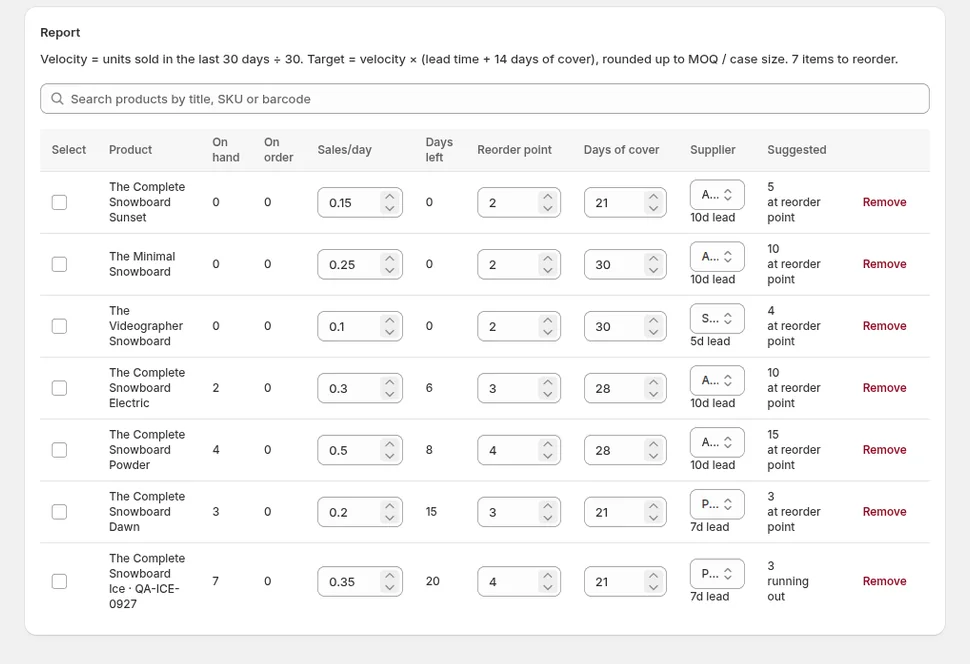
| Reorder point per variant and a low-stock report | No native field | Yes | Restock Ops keeps a reorder point or days-of-cover target per watched variant, uses the supplier lead time, and lists suggestions from recent sales (30 days by default). |
| Suggested order quantity with MOQ and case size | No | Yes | Suggestions round up to the supplier's MOQ and case size when set. |
| Supplier records with lead time, minimum order, terms, notes, vendor links | Supplier contact, terms, currency | Yes | Restock Ops stores lead time, minimum order value, payment-terms days, free-text notes and the Shopify vendors a supplier carries. |
| Barcode labels for the received quantities | No (Retail Barcode Labels app prints from the product list) | Yes | See labels from a PO. |
| Scanner stocktake with expected vs counted review | Count in POS/admin, adjust | Yes | See barcode stocktakes. |
| Create or receive native POs from an app | Read-only API, preview | Not applicable | The Admin API exposes purchase orders read-only in the 2026-10 release candidate; there are no create/receive mutations. Restock Ops therefore keeps its own PO records. |
| Exclude archived products from reorder suggestions | n/a | Not verified | A 2023 Stocky complaint. Restock Ops has not been checked for this specific behaviour; listed here rather than claimed. |
| Demand forecasting | No | No | Neither. Restock Ops uses reorder points and recent velocity, not forecasts. |
Notes on the rows people ask about most
Reorder point. Shopify has no reorder-point field on a variant. What exists natively is inventory tracking plus Shopify Flow templates that send an email or Slack message when a variant's quantity drops to a threshold (Product variant inventory quantity changed). That is an alert, not a suggestion: it does not know your lead time, what is already on order, or how many you should buy. Stocky computed a reorder point from lead time and daily sales. In Restock Ops you add the variants you want watched, set either a reorder point or a days-of-cover target per variant, and the report combines that with the supplier lead time, recent sales velocity and what is already on order, then rounds the suggestion to MOQ and case size.
Export. The help page describes one export, “Export PDF” on a single PO, meant to be sent to a supplier. There is no CSV of the PO list. The API side is not a workaround yet either: purchase order objects are documented read-only for the 2026-10 release candidate and the unstable version, with no mutations, so an app can at best read them. Restock Ops sidesteps this by owning its PO records and exporting them as CSV, one PO or the whole list.
Due dates and totals. A May 2024 Stocky review on the review page complained that PO totals were missing from the list view; a June 2024 review listed “no report to view PO's by due dates” and “no ability to mass export or import POs”. Native Shopify shows a cost summary and payment terms on the PO. Restock Ops keeps an invoice number, paid/unpaid status and due date per PO so the person paying bills can filter what is outstanding.
Archived products in suggestions. A July 2023 Stocky review asked for “excluding archived products from PO suggestions”. We are not going to claim Restock Ops handles this until we have tested it; it is on the list.
How to use the list
- If your gaps are only CSV import and PDF export, stay native and use the transfer for receiving. It is free with your plan and improving.
- If you receive deliveries in pieces, need on-order visibility, print labels for what arrived, or want a reorder point that accounts for lead time, you need something that owns the PO document. That is where Restock Ops sits: app-owned POs and receipts that write back to Shopify inventory through previewed, logged adjustments, from $19/month.
- Whatever you choose, keep Shopify as the source of truth for quantities and cost. Our Stocky replacement map explains why that matters more than any single feature.
FAQ
Does Shopify have a reorder point?
Not as a field on the variant. Shopify Flow can alert you when quantity drops below a number you pick, but it does not compute a reorder point from lead time and sales or suggest a quantity. Restock Ops does.
Can I export Shopify purchase orders to CSV or Excel?
Natively, no. The help page describes an Export PDF for a single PO. Purchase orders are read-only in the Admin API as of the 2026-10 release candidate, so apps cannot create them either. Restock Ops exports its own POs as CSV.
Can Shopify receive part of a purchase order?
Yes, through the linked inventory transfer: you accept or reject specific quantities per shipment. The PO itself only has Draft and Ordered statuses; receiving progress lives on the transfer.
Will this list go out of date?
Yes. It was checked on 28 September 2026 against Shopify's help centre and API docs, and we will re-check it when Shopify changes purchase orders. Each row links its source so you can verify it yourself.
Try it on your store. Restock Ops adds purchase orders with partial receiving, supplier notes, cost history, barcode labels, scanner stocktakes and a reorder report on top of Shopify inventory. From $19/month, 14-day free trial.
Sources
- Shopify Help Center: Creating and managing purchase orders
- Shopify Help Center: Creating an inventory transfer for your purchase order
- Shopify Help Center: Understanding inventory states
- Shopify Help Center: Shopify Flow — Product variant inventory quantity changed
- Shopify Admin API (2026-10 RC): InventoryPurchaseOrder
- Shopify Community: Native Shopify PO & Receiving — Wishlist from a Long-Time Stocky User (Jul 2026)
- Stocky 1–2★ reviews, Shopify App Store (accessed 28 Sep 2026)