Built for retailers replacing Stocky

Purchase orders, receiving and stocktakes — on top of Shopify inventory

Restock Ops adds the purchasing layer Shopify POS is missing: partial receiving, supplier notes, cost history, barcode labels and scanner stocktakes. Shopify stays the source of truth.

From $19/month · 14-day free trial · billed by Shopify

Every write previewed and loggedOne-click undoWorks with any USB or Bluetooth scanner
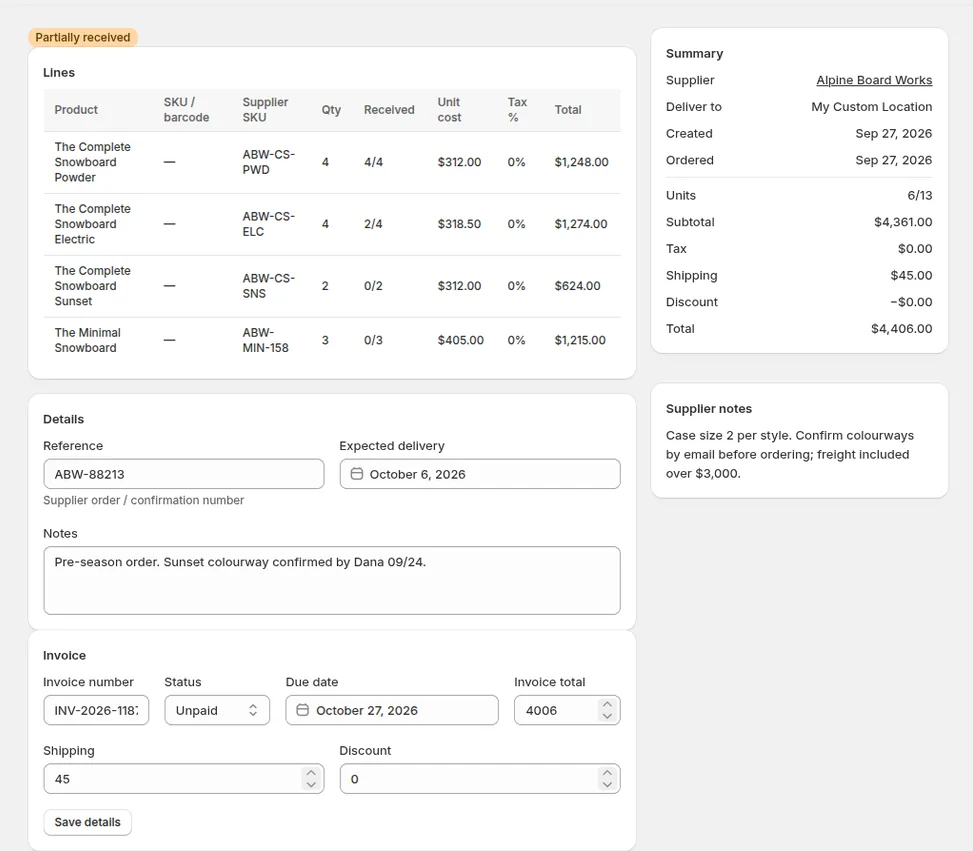
Restock Ops purchase order RO-0004, partially received, inside the Shopify admin
Coming from Stocky?

The gaps merchants listed when Stocky shut down. Closed.

Shopify’s native purchase orders and transfers cover part of the job. These are the pieces small POS retailers said they lost on 31 August 2026 — and what Restock Ops does about each.

“On order” is invisible until a transfer is in transitOrdered quantities show up as Shopify incoming stock the moment you mark a PO ordered
Receive all of a PO or nothingReceive the 6 boxes that arrived; the other 7 stay on order
No supplier notes or vendor linksMOQ, lead time, case sizes and payment terms on every supplier, linked to your vendors
No labels for what you just receivedPrint retail barcode labels straight from the receipt
No stocktakes with a scannerScan, see expected vs counted, review every discrepancy, apply once
No invoice status or due datesPaid / unpaid, due date and invoice total on the PO, filterable in the list
No PO exportOne-click CSV of any PO or the whole list
Cost history lostUnit cost updates on receipt; every change kept per variant
What you get

An ops layer, not another inventory system

No forecasting suite, no second stock ledger to reconcile. The documents Shopify doesn’t keep, and clean writes to the quantities it does.

Purchase orders that match how deliveries actually arrive

Build a PO per supplier with supplier SKUs, unit cost and tax per line. Mark it ordered and the quantities appear as incoming stock in Shopify. When boxes show up, receive exactly what came in — the rest stays on order for the next receipt.

  • Partial receiving, unlimited receipts per PO
  • Invoice number, paid/unpaid, due date, shipping and discount
  • CSV export of a PO or the whole list
A partially received purchase order in Restock Ops with lines, invoice status and supplier notes

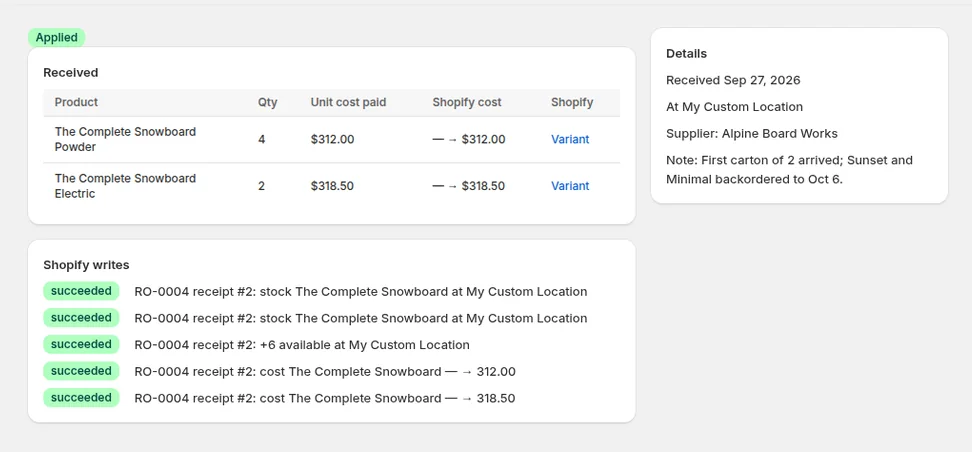
Every receipt updates Shopify — after you see the preview

Before anything is written you see the exact quantity and unit-cost changes per variant. Confirm, and Restock Ops writes them to Shopify inventory with a receipt reference, keeps the cost history, and logs the write so it can be undone.

  • Shopify stays the source of truth
  • Cost history per variant, unit cost updated on receipt
  • Undo any receipt or write from the log
An applied receipt showing Shopify inventory and cost writes that succeeded

Stocktakes with the scanner you already own

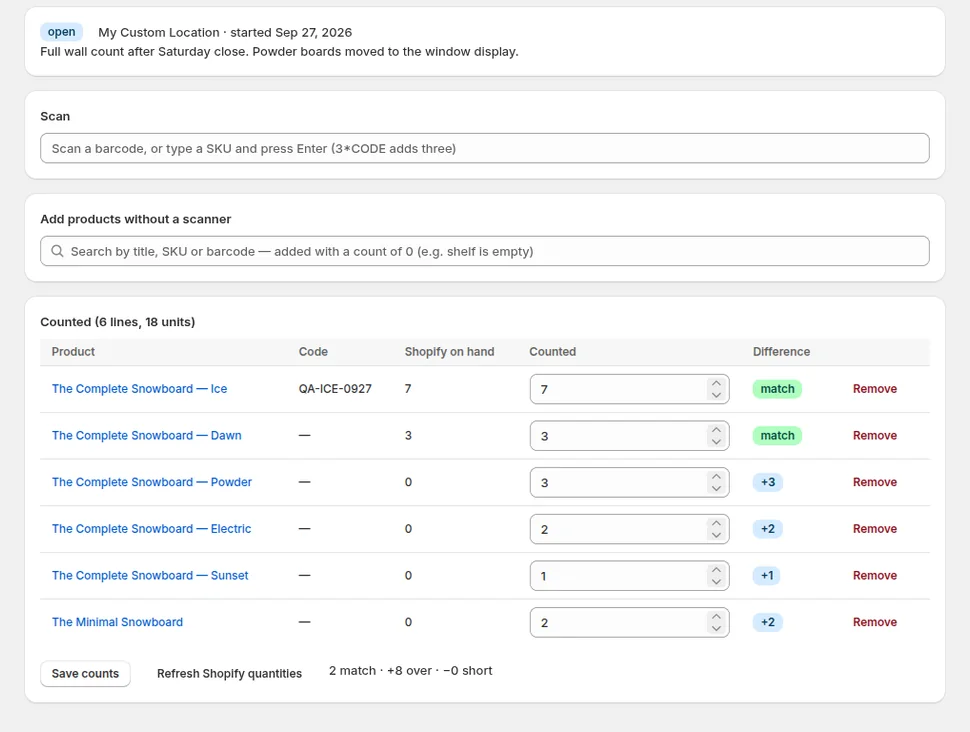
Open a count, point any keyboard-wedge barcode scanner at the shelf and go. Restock Ops shows Shopify on hand next to what you counted, flags every difference, and applies the whole count as one logged adjustment you can reverse.

  • Scan or type SKUs; search for items with no barcode
  • Expected vs counted with match / over / short badges
  • Apply once, undo once
A stocktake in progress with expected versus counted quantities and differences highlighted

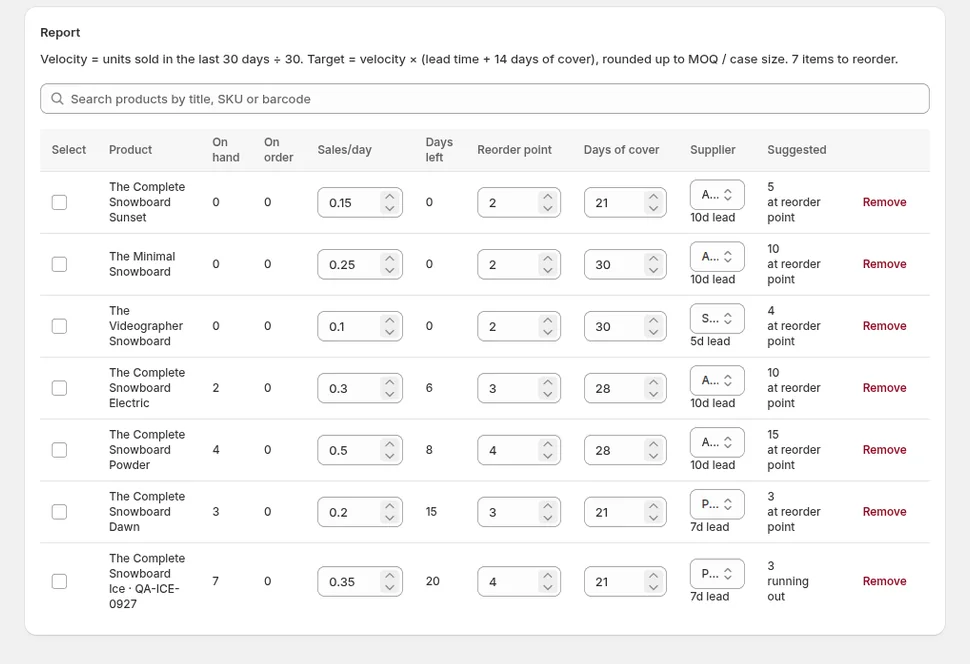
Reorder from reorder points and real sales velocity

Set a reorder point and days of cover per product, let the report pull sales from the last 30 days, and see what is running out before it does. Tick the rows you want and Restock Ops drafts the purchase order per supplier.

  • Sales/day, days left and suggested quantity per product
  • Respects supplier lead time, MOQ and case size
  • Selected rows become a draft PO in one click
The reorder report with sales velocity, days of cover and suggested quantities

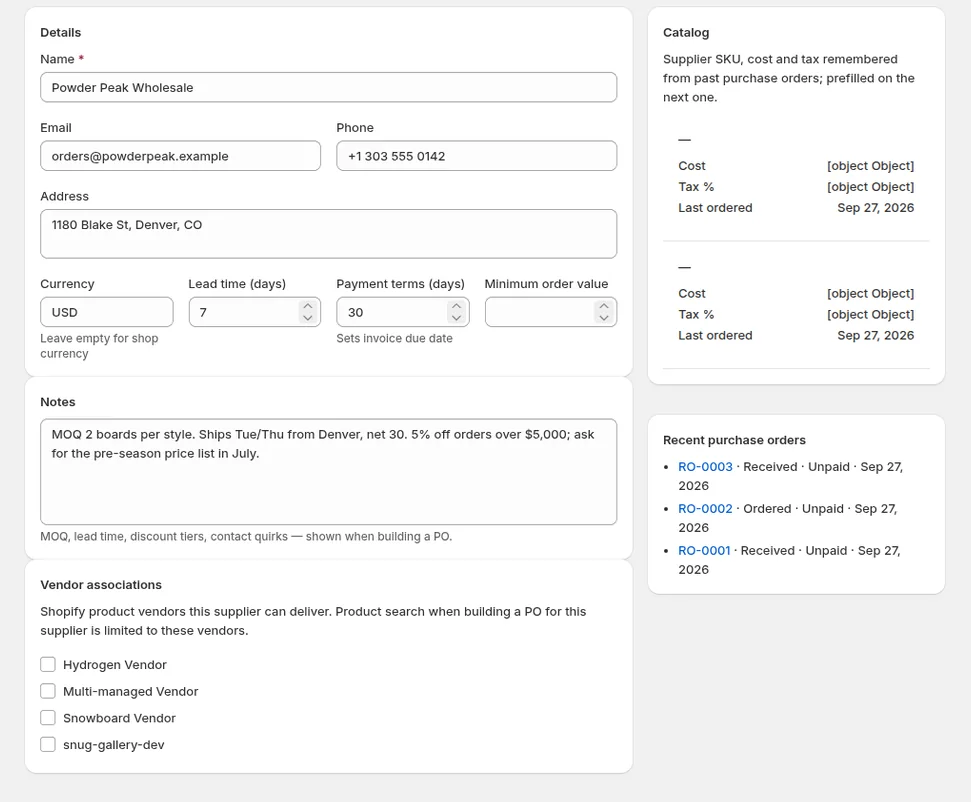
Suppliers with the notes your team keeps in their heads

Minimum order, lead time, case sizes, discount tiers, payment terms, who to email — on the supplier record, shown on every PO. Link suppliers to your Shopify vendors so new products land on the right PO.

  • Free-form notes visible while ordering and receiving
  • Vendor associations and per-supplier SKUs
  • Labels for received units from Avery sheets or Dymo rolls
A supplier record with notes, lead time and linked vendors
See it run

Purchase order, partial receipt, supplier, stocktake

90 seconds on a development store: the PO list and a partially received PO, the receive screen, a supplier with notes, a scanner stocktake and the reorder report.

How it works

Set up in an afternoon, not a quarter

Install and add suppliers

Install from the Shopify App Store, add your suppliers with their notes, and link them to your vendors. Products and inventory come from Shopify — nothing to import.

Order and receive

Create POs by hand or from the reorder report. When stock lands, receive what arrived, check the preview, confirm. Shopify quantities and costs update; labels print.

Count and correct

Run stocktakes with a scanner whenever you like. Review the differences, apply them as one adjustment, and undo from the log if a shelf was counted twice.

Pricing

Two flat plans. Every feature on both.

Priced for a shop, not an ops team. Billed through Shopify, on your Shopify invoice, with a 14-day free trial.

Starter

$19 / month

One location. Every feature.

  • 1 location
  • Unlimited purchase orders, suppliers and receipts
  • Partial receiving, cost history, invoice tracking, CSV export
  • Barcode labels, scanner stocktakes, reorder report
  • 14-day free trial
Start free trial

No usage fees, no per-order charges. Development stores use the app free.

FAQ

Questions retailers ask before installing

Does Restock Ops replace Shopify's inventory?

No. Shopify stays the source of truth for quantities and unit cost. Restock Ops keeps the documents Shopify doesn't (purchase orders, receipts, supplier notes, stocktakes, cost history) and writes the resulting changes to Shopify inventory after you approve a preview.

Can I receive part of a purchase order?

Yes. Enter what actually arrived, line by line; the rest stays on order and can be received later in as many receipts as you need. Each receipt updates Shopify quantities and unit cost and prints its own labels.

Which barcode scanners work?

Any keyboard-wedge USB or Bluetooth scanner: it types the barcode into the scan field and presses Enter. Stocktakes also accept typed SKUs and a product search for shelves with no scanner at hand.

What label sizes can I print?

Avery-style sheets and Dymo/Brother roll sizes from the browser print dialog, with product title, variant, price and an EAN, UPC or Code 128 barcode. Labels come from a receipt (only what arrived) or a whole PO.

What happens if I apply a wrong count or receipt?

Every write to Shopify is logged under Settings → Shopify write log with an Undo action that applies the inverse adjustment. Receipts can be undone from the receipt page.

How is billing handled?

Through Shopify. Pick Starter ($19/month) or Pro ($39/month) inside the app; the charge appears on your Shopify invoice after a 14-day free trial. No usage fees.

Does the app read customer data?

No. The reorder report reads aggregate units sold per variant to compute sales velocity. No customer names, addresses, emails or payment details are read or stored.

Get purchasing back under control

Restock Ops is a new app — no reviews yet, and we read every support email ourselves. Try it free for 14 days on your own store.