Why Shopify unit cost is wrong after receiving a PO
Shopify stores one cost per item and no history, so receiving at a new price silently changes your margins. How cost history and average cost fix it.
You receive a purchase order, run a margin report a week later, and the numbers are off. Some products show the price you paid three orders ago, some show nothing at all, and the ones you just received look either too profitable or unprofitable. If Shopify's inventory cost is wrong after a purchase order, it is rarely a bug: it is a consequence of how Shopify stores cost, and of what your receiving tool did (or didn't do) at the moment the stock came in.
This post explains where Shopify keeps unit cost, why it goes stale or missing, how to correct it by hand, and how Restock Ops records a cost history per receipt and updates Shopify's unit cost using either the last cost paid or a weighted average.
The symptoms merchants describe
Two complaints about cost recur on the Stocky review page. In August 2024 a merchant wrote that when they enter a new product into Shopify, “the cost of the new product does not automatically transfer over” to the PO. In August 2023, a three-year Stocky user found that on an in-stock inventory report “any new products ordered and received have no cost listed”, even though the PO had been created and received with prices. Both are the same root problem seen from two ends: cost lived in one place, the purchase lived in another, and nothing reliably carried it across.
Merchants moving to Shopify's native purchase orders raise a related point in the shutdown thread: when you add a product to a PO, the cost and SKU you entered on the product do not always come with it. Shopify's help page confirms the current behaviour: the PO line cost is auto-filled from your previous purchase orders with that supplier, and only falls back to the variant's cost per item if there is no previous PO (Creating and managing purchase orders).
Why it happens: Shopify stores one cost, not a history
Every Shopify variant has an inventory item, and the inventory item has a single `unitCost`. Apps read and write it through the Admin API's inventoryItemUpdate mutation, which updates “whether inventory is tracked, cost, SKU, and whether shipping is required”. There is one number per item. There is no field for “what I paid on 6 October”, no per-location cost, and no built-in record of what the value was before it changed.
That single number is what Shopify's margin and profit reports use. So three things follow:
- If nobody updates the cost when a delivery arrives at a new price, reports keep using the old one. For seasonal goods or anything with freight surcharges, that can be months stale.
- If a product was created without a cost (common when staff add products quickly on the shop floor), it stays empty until something writes it. Receiving a PO with a price on the line does not, by itself, fill it in — unless the receiving tool explicitly does that write.
- If the cost is overwritten with the newest invoice price, the units already on the shelf, bought cheaper, are now valued at the new price. That is the “last cost” method and it is fine for fast-moving stock, but it overstates the value of slow movers. Weighted average cost blends old and new units, which is what many small retailers expect from the term “average cost” — and it requires knowing how many units were on hand before the receipt, at what cost.
The manual fix in the Shopify admin
Without an app, the honest workaround is a spreadsheet and discipline:
- When a delivery arrives, receive it against the transfer for the purchase order so quantities update (Purchase orders).
- For each line where the invoice price differs from the variant's current cost, open the variant and edit “Cost per item” by hand. Shopify offers no bulk cost edit on the transfer.
- If you want weighted average rather than last cost, do the arithmetic first: (on-hand units × old cost + received units × new cost) ÷ (on-hand + received). Record the result and the inputs somewhere outside Shopify, because Shopify will not remember the previous value.
- Repeat for every receipt, including the second and third deliveries of a partially shipped PO.
This works for a shop receiving one PO a week. It falls apart at ten lines per delivery, and it is exactly the job people were relying on Stocky to do before it shut down on 31 August 2026.
How Restock Ops handles cost on every receipt
Restock Ops treats cost as something that happens at receiving time, because that is when you know the real price. The flow in the current build:
- On the receive screen, each PO line shows the quantity outstanding and the unit cost from the PO. Next to the cost field you see the variant's current Shopify cost, so a difference is visible before you type anything. Change the unit cost if the invoice differs.
- Click Preview changes. Restock Ops reads the live on-hand quantity and current cost from Shopify and shows, line by line, the quantity change and the cost change it is about to make. Nothing is written yet.
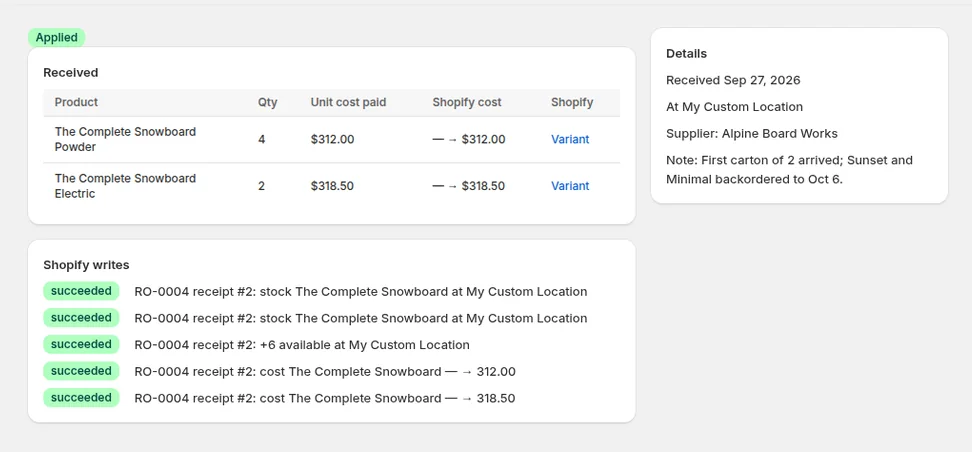
- Confirm. The receipt is saved with the quantity and unit cost paid per line, Shopify's `available` quantity is adjusted with the reason “received”, and the inventory item's unit cost is updated where it changed.
- A cost history row is stored for every line whose cost moved: previous cost, new cost, the method used, and a link back to the receipt. You can browse it in Settings → Cost history or on the receipt itself.
The method is a shop-wide setting with two options. Last cost sets Shopify's unit cost to the price you just paid. Weighted average computes (on-hand × current cost + received × paid cost) ÷ total units, using the on-hand quantity Shopify reported at preview time; if the item had no cost yet or nothing on hand, the received price is used directly, which is what closes the “new product has no cost” gap. Either way, the number Shopify ends up with is the one your reports will use, and the history explains how it got there.
Two design choices matter for trust. First, Shopify remains the only place that holds the current cost; Restock Ops keeps the history, not a competing value. Second, every write is logged with its reference and can be undone: undoing the most recent receipt for a PO puts quantities back and restores the previous cost from the history row.
Which method should a small retailer pick?
- Last cost if prices are stable or you sell through fast. It is simple to reason about and matches what most invoices say.
- Weighted average if you carry stock for months, buy in uneven batches, or your accountant values inventory that way. It smooths out a freight surcharge on one delivery so a single expensive carton does not reprice every unit on the shelf.
- Whatever you pick, apply it consistently. Switching methods mid-year makes the history harder to explain, so change it at a stocktake or year end.
Limits to know about
- Cost history starts when you start receiving through Restock Ops. Purchases made before that are not reconstructed.
- Landed cost allocation (spreading freight or duty across lines) is not built in; enter the landed unit price on the line if you want it reflected.
- Shopify's cost is per inventory item, not per location. If you run several locations, Restock Ops updates the single Shopify cost the same way Shopify does; it does not keep a separate cost per store.
FAQ
Does Shopify keep a history of cost per item?
No. The inventory item has a single unit cost field that apps update through inventoryItemUpdate. Any history has to be kept by the tool that changes it, which is what Restock Ops does per receipt.
What is the difference between last cost and average cost?
Last cost replaces the unit cost with the price on the newest receipt. Weighted average blends the units already on hand at the old cost with the received units at the new cost. Restock Ops supports both as a shop-wide setting.
Why did a product I just received have no cost in reports?
Because the variant's cost per item was empty and nothing wrote to it when the stock arrived. Restock Ops writes the received cost to Shopify when the item has no cost yet, regardless of method.
Can I fix a receipt where I typed the wrong cost?
Yes, if it is the most recent receipt on that PO: undo it, which restores the previous Shopify quantities and cost from the history, then receive again with the right figure.
Try it on your store. Restock Ops adds purchase orders with partial receiving, supplier notes, cost history, barcode labels, scanner stocktakes and a reorder report on top of Shopify inventory. From $19/month, 14-day free trial.