Purchase order statuses: what each step does in Shopify
Draft, ordered, partially received, received, closed, canceled: what each Restock Ops status means, what it writes to Shopify, and how to undo a step.
A purchase order is a document that changes meaning over its life. On Monday it is a shopping list. On Tuesday it is a promise the supplier has accepted. Two weeks later it is half a delivery and a short-ship note, and eventually it is a record nobody should edit. Software that treats all of those as one editable form gets you stock counts that drift and a PO history nobody trusts.
Restock Ops gives a PO six statuses and lets each one do a small, fixed set of things. This post walks through them in order: what you can change in each, what is written to Shopify when you move between them, and which moves can be undone. If you have ever wondered whether cancelling a PO puts the incoming quantity back, or why a received PO cannot be cancelled, the answers are below.
The six statuses at a glance
The list page's open filter shows drafts, ordered and partially received POs, which is the set that still needs something from you. Received, closed and canceled POs are history and stay out of the way unless you ask for them.
| Status | You can | Written to Shopify | Goes to |
|---|---|---|---|
| Draft | Edit header and lines, add or remove products, delete the PO | Nothing | Ordered, or deleted |
| Ordered | Receive deliveries, export, print labels, mark invoice status | Incoming quantity at the destination, if projection is on | Partially received, Received, Canceled, or back to Draft |
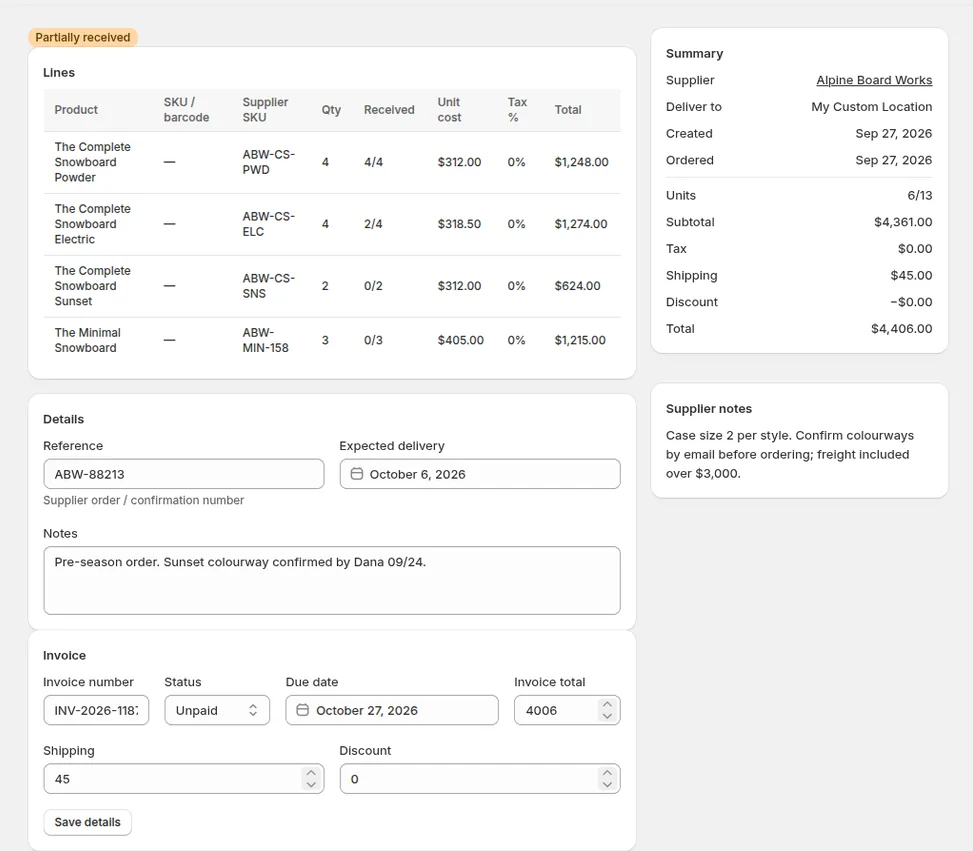
| Partially received | Receive more, close | Available quantity and cost per receipt; incoming reduced | Received or Closed |
| Received | Close | Final receipt already written | Closed |
| Closed | Read, export | Any remaining incoming projection removed | Final |
| Canceled | Read, export | Any incoming projection removed | Final |
Draft: the only status where lines are free
A new PO starts as a draft. This is where you pick the supplier, the destination location, the expected date, and the products with their quantities, unit costs and tax percentages. Nothing you do here reaches Shopify. You can leave a draft open for a week while you check sales, come back and change every line, or delete it outright. Deleting is only possible in draft, because a draft is the only state in which the document has not yet meant anything to anyone else.
Quantities and costs are what a draft is for, so take the time here. The reorder report can fill a draft from reorder points and recent sales, and the supplier catalog remembers the cost and supplier SKU from the last time you ordered each item, so a repeat order is mostly a check rather than typing.
Ordered: the promise, and the first write
Mark as ordered is the step with the most going on behind the button. It needs at least one line, and every line needs a quantity. When it runs, three things happen. The PO gets its ordered date and moves to Ordered. The supplier's catalog is updated with each line's supplier SKU, cost and tax, and the date, so the next PO to that supplier starts from these figures. And if the invoice status was still blank, it becomes Unpaid, which is what lets the person who pays the bills see it in the invoice list described in Supplier invoice tracking on Shopify purchase orders.
The fourth thing is optional. If you have turned on incoming projection in Settings, the ordered units are added to Shopify's incoming quantity at the destination location. Available stock does not move; incoming is Shopify's own state for stock that is on its way, and it shows on the product page so staff do not reorder what is already coming. The setting exists because not every store wants an app writing inventory states before a box has arrived, and because the write can fail if, say, the product is not stocked at that location. When it does, the PO is still marked ordered and the message tells you what could not be projected.
Ordered is also where the exports live. The PO can be downloaded as CSV for the supplier or your accountant, and barcode labels can be printed from its lines before anything arrives.
Back to draft: the undo for a premature click
An ordered PO with nothing received yet can go back to draft. The ordered date is cleared and the lines become editable again. This is for the case where you marked it ordered and then the supplier rang to say the case size changed, or you noticed a line was missing before you sent anything. Once a single unit has been received against the PO, the door closes: a document with receipts behind it cannot pretend it was never ordered.
Back to draft changes only the PO's own status. If you use incoming projection, treat a reopened PO like a new one when you mark it ordered again, and check the product's incoming figure in Shopify afterwards rather than assuming.
Partially received and received: the deliveries
Receiving is where Shopify's numbers change. Each receipt records, per line, how many units arrived and at what cost; Restock Ops writes the received quantity to available stock at the destination, writes the cost per item according to your cost policy, and, if projection is on, takes the received units out of incoming. A delivery that covers everything moves the PO to Received. A delivery that covers some lines, or some units of a line, moves it to Partially received and leaves the balance open for the next box. Short shipments, over-shipments and wrong items are handled on the receipt itself; the detail is in Partial receiving on Shopify purchase orders.
A partially received PO can take as many receipts as it needs. Suppliers back-order, split across two carriers and send the heavy item separately, and the PO simply stays open until the lines add up or you decide they never will.
Closed: when the rest is not coming
Close is available on partially received and received POs only. For a fully received PO it is a tidy-up: the document is complete, closing marks it as finished and takes it out of the open list. For a partially received PO it is a decision: the missing units are not coming, and you are not going to wait. The lines keep their ordered and received figures, so the shortfall is visible forever, but the PO stops asking for attention.
Closing also cleans up. If incoming projection put the ordered units into Shopify's incoming quantity, any units still projected, which is exactly the shortfall, are removed when the PO closes. That is the answer to a question that comes up a lot after a Stocky migration: a product that shows incoming stock nobody expects is usually a PO that was never closed, and the fix is to close it, as covered in Incoming inventory stuck after Stocky. If Shopify refuses the removal for some reason, the PO still closes and the message tells you which items to check by hand.
Nothing else is written. Closing does not create a receipt, does not adjust available stock and does not change cost.
Canceled: when the order never happened
Cancel is available on drafts and ordered POs, and on nothing else. A canceled PO keeps its lines and gets a canceled date, so you can see what you nearly bought and when you changed your mind. Like close, cancel removes any incoming projection the PO had placed in Shopify, since units that will not ship should not show as on their way.
The reason a partially received PO cannot be canceled is the same reason it cannot go back to draft: stock has arrived and been written into Shopify against it. Cancelling would leave receipts pointing at a document that claims not to exist. If a supplier sends half and then cancels the rest, receive what came, then close. The record then says exactly what happened: ordered 40, received 20, closed.
A practical routine
- Keep a PO in draft until you have actually sent it. Marking ordered is a statement that the supplier has the order, and it is what updates the supplier catalog for next time.
- Receive against the delivery note, not the PO. Every receipt is a write to Shopify; make it match what is on the shelf.
- Close partially received POs once the supplier confirms the balance is not coming. An open PO with a stale shortfall is the most common cause of a wrong incoming figure.
- Cancel, do not delete, an ordered PO the supplier could not fill. The canceled record is the evidence when the invoice for it turns up anyway.
- Export before closing if your accountant wants the document, although closed and canceled POs can still be exported later.
FAQ
Can I cancel a Shopify purchase order after receiving part of it?
In Restock Ops, no. Once units have been received the PO has written stock and cost into Shopify, so it can only move forward: receive more, or close it. Closing a partially received PO records the shortfall and removes any remaining incoming projection; it is the right action when the balance will not ship.
What does marking a purchase order as ordered write to Shopify?
By default nothing to inventory; it sets the ordered date, updates the supplier catalog with each line's SKU, cost and tax, and sets the invoice status to Unpaid. If incoming projection is enabled in Settings, the ordered units are also added to Shopify's incoming quantity at the destination location. Available stock is never changed until you receive.
Does closing a purchase order remove the incoming quantity?
Yes. When a PO is closed or canceled, any units it had projected into Shopify's incoming quantity are removed. Received units were already removed from incoming at each receipt, so what disappears on close is the shortfall. If Shopify rejects the update, the PO still closes and you are told which items to check.
Can an ordered purchase order go back to draft?
Only while nothing has been received against it. Back to draft clears the ordered date and makes the lines editable again. Once any receipt exists, the PO can only be received further or closed.
Try it on your store. Restock Ops adds purchase orders with partial receiving, supplier notes, cost history, barcode labels, scanner stocktakes and a reorder report on top of Shopify inventory. From $19/month, 14-day free trial.