Purchase orders and receiving on Shopify without POS Pro
Stocky needed POS Pro at $89/month. What you can do in the Shopify admin without it, where POS Pro is still required, and how Restock Ops fits.
If you searched for purchase orders on Shopify without POS Pro, you have probably hit the wall that a lot of small shops hit: the inventory tool you were told “works with Shopify POS” turned out to need the Pro subscription, at $89 USD per month per location on top of your Shopify plan. For a single-till store on a Basic plan that is often more than the plan itself.
This post separates what actually requires POS Pro from what only ever required the Shopify admin, and explains where Restock Ops sits: an embedded admin app that uses standard inventory permissions and has no dependency on Shopify POS at all.
The complaint
Stocky was bundled with POS Pro; Shopify's help centre describes it as “an inventory management app that's included with Shopify POS Pro subscriptions” (Shopify Help Center). A December 2025 review on the Stocky review page put the experience bluntly: the merchant installed it, wondered why it did not work, and realised it was “pushing you to upgrade to Shopify POS Pro at $89 per month”, adding that they had “no idea why they wouldn't allow small businesses on Shopify to have access to the app for even the most basic inventory management”.
Stocky is gone as of 31 August 2026, but the POS Pro question has not gone with it, because some of Shopify's own inventory workflows are still tied to that subscription.
What needs POS Pro, and what never did
The clearest way to think about it is by where the work happens.
| Job | Shopify admin (browser) | Shopify POS app | Source |
|---|---|---|---|
| Create a purchase order | Any plan | Not available in POS | Purchase orders |
| Receive a PO via its linked transfer | Any plan | Requires POS Pro | Fulfilling and receiving transfers in POS |
| Adjust inventory quantities | Any plan | Quick count extension in the POS app | Changing inventory quantities in POS |
| Print barcode labels | Retail Barcode Labels app, desktop | Not supported in POS | Retail Barcode Labels |
| Stocky (POs, counts, labels) | — | Was included with POS Pro; no longer installable | Stocky help page |
So purchasing itself never needed POS Pro. What POS Pro buys you, for inventory, is doing the receiving on the POS device rather than in a browser, and the Stocky bundle. Shopify's POS help page for transfers is explicit: “Your Shopify POS location must be on the Shopify POS Pro subscription for your staff to fulfill and receive transfers”, and it lists further limits — you cannot create a transfer in POS, and you “can't print barcode labels when you receive incoming inventory”. Shopify's pricing page currently lists POS Pro at $89 USD per month per location, on top of a Basic plan at $29, Grow at $79 or Advanced at $299 per month.
The workaround with the admin alone
- Create the purchase order in Products › Purchase orders and mark it Ordered (Creating and managing purchase orders).
- Create the linked inventory transfer from the PO. When the boxes arrive, open the transfer in a browser — a laptop in the back room, or the browser on a tablet — and accept the quantities that arrived (Creating an inventory transfer for your purchase order).
- Update unit costs by hand on any variant where the invoice price changed, since the transfer does not do that for you.
- Print labels from the Retail Barcode Labels app on a desktop computer connected to your label printer.
This costs nothing beyond your plan. Its limits are the ones in our native purchase orders checklist: no cost history, no labels tied to what arrived, no reorder point, PDF-only export, and receiving that lives on a different object from the PO.
How Restock Ops fits
Restock Ops is an embedded Shopify admin app. It opens inside the Shopify admin in a browser and talks to Shopify through the Admin API with these permissions: read and write products and inventory, read locations, read and write inventory transfers and shipments (used for multi-location moves on the Pro plan), and read orders (used only to compute sales velocity for reorder suggestions). There is no POS extension and nothing in the app checks for or depends on a POS subscription. If your store can install apps and you can see Products › Inventory in the admin, the receiving screen works the same way.
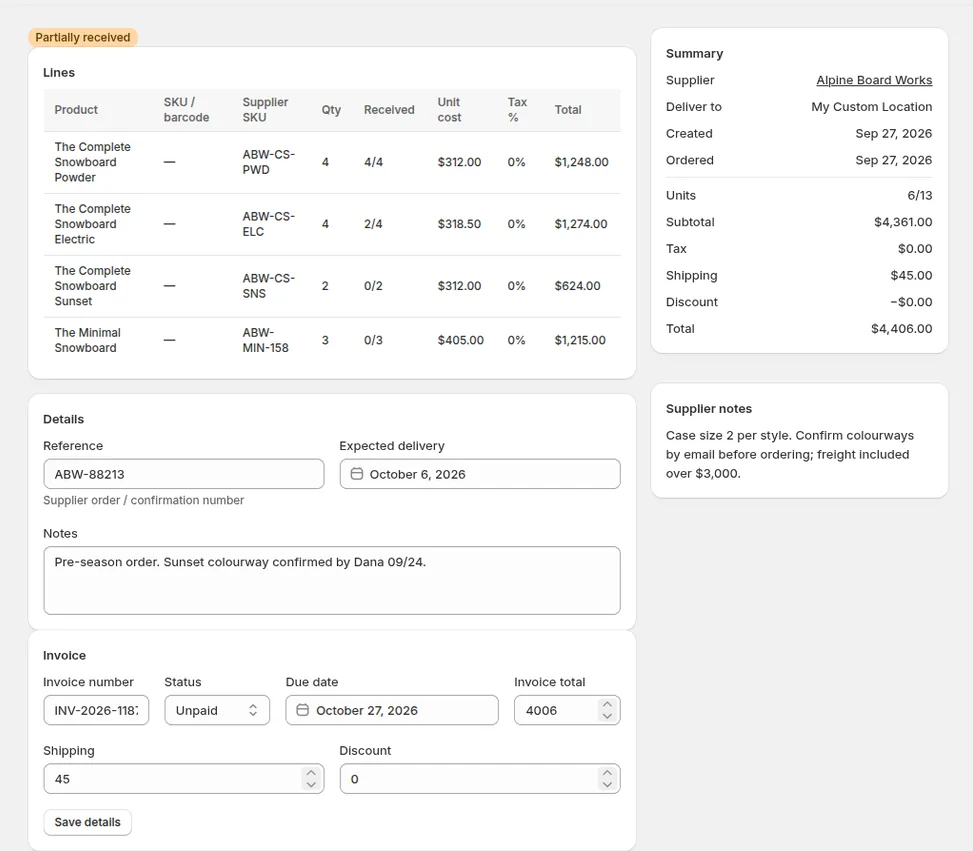
What that gets you without POS Pro: app-owned purchase orders with supplier notes and invoice status; receiving line by line in as many partial receipts as the supplier needs, with a preview of every Shopify quantity and cost change before it is written; cost history and an updated Shopify unit cost on each receipt; barcode labels from the receipt through the browser print dialog; scanner stocktakes with a discrepancy review; and a reorder report. Starter is $19 USD per month for one location and Pro is $39 for up to five, each with a 14-day trial — a fraction of the POS Pro fee that Stocky used to sit behind.
What we do not claim: that it replaces the POS app's receive-on-device screen. Restock Ops runs in the admin. Staff receive at a laptop or in the admin on a tablet browser, not from the POS checkout screen. If receiving inside the POS app is essential to your floor, that is still a POS Pro feature.
Things to check before you decide
- Count how often you actually receive at the till versus the back room. Most small shops receive where the boxes land, and that is usually next to a computer.
- If you keep POS Lite for selling, nothing here changes that; Restock Ops writes to the same Shopify inventory the POS sells from.
- If you need multiple locations, note that Restock Ops Pro covers up to five; the Starter plan is one location. Shopify's own location limits per plan are on the pricing page.
FAQ
Can I create and receive purchase orders on Shopify without POS Pro?
Yes, in the Shopify admin: create the PO, mark it Ordered, and receive through its linked inventory transfer in a browser. POS Pro is only required to receive transfers inside the Shopify POS app.
Does Restock Ops require Shopify POS or POS Pro?
No. It is an embedded admin app using standard product and inventory permissions. It has no POS extension and does not check your POS subscription.
Does Restock Ops work on the Basic Shopify plan?
It needs a store that can install apps from the Shopify admin and uses the permissions listed above; it does not require a particular Shopify plan tier or POS Pro. Multi-location moves require the Restock Ops Pro plan.
Why did Stocky need POS Pro?
Shopify bundled Stocky with the POS Pro subscription; its help page describes it as included with POS Pro. It is no longer available to install.
Try it on your store. Restock Ops adds purchase orders with partial receiving, supplier notes, cost history, barcode labels, scanner stocktakes and a reorder report on top of Shopify inventory. From $19/month, 14-day free trial.
Sources
- Stocky 1–2★ reviews, Shopify App Store (accessed 28 Sep 2026)
- Shopify Help Center: Stocky
- Shopify Help Center: Fulfilling and receiving inventory transfers in Shopify POS
- Shopify Help Center: Changing inventory quantities in the Shopify POS app
- Shopify Help Center: Purchase orders
- Shopify Help Center: Creating an inventory transfer for your purchase order
- Shopify Help Center: Retail Barcode Labels app
- Shopify pricing (accessed 28 Sep 2026)