Holiday ordering with a reorder report: order-by dates and velocity
Working back from Black Friday 2026 to the day each PO must leave: lead time, days of cover, a seasonal velocity override and incoming stock.
It is the first week of October. Factories across China are closed for Golden Week, the national holiday that runs from 1 to 7 October every year, and anything you ask a supplier for this week will be quoted from the eighth. Black Friday is 27 November 2026, Cyber Monday the 30th, and the last date most carriers will promise a pre-Christmas delivery to a customer sits somewhere in the third week of December. Between those dates every purchase order for the season has to be written, confirmed, shipped, received and put on a shelf.
A reorder report built on a trailing sales average is a fine tool for an ordinary week in March. In October it will quietly tell you the wrong thing, because the thirty days behind you look nothing like the thirty days ahead. This post is about making the report useful for the season anyway: which numbers to override, how to turn days of cover into a calendar, and where incoming stock and lead times belong in the sum. It uses Restock Ops for the examples, but the arithmetic is the same on paper.
What the report calculates, and where the season breaks it
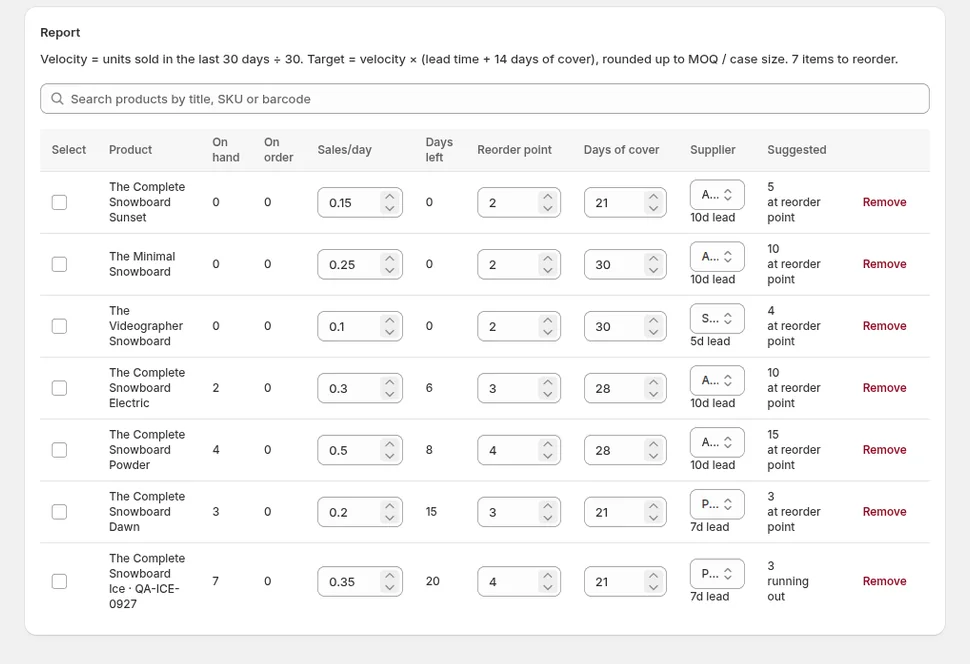
Restock Ops's reorder report works per inventory item. Velocity is units sold over the velocity window divided by the window length, thirty days by default and adjustable from seven to 365 in Settings. Stock position is on hand plus incoming, where incoming is the quantity on open purchase orders and transfers that Shopify tracks in its incoming inventory state. Days of cover is position divided by velocity. The target is velocity multiplied by the supplier's lead time plus your days of cover, fourteen by default, and the suggested order is the gap between position and target, rounded up to the case size and then to the supplier's minimum.
Two of those inputs stop being true in the run-up to the holidays. The velocity is backward-looking: a store that sold 40 candles in September will sell 160 in November, and the report cannot know that from September's orders. The lead time is a single number per supplier, and a supplier that quotes ten days in June quotes twenty in October because every customer they have is ordering at once and the freight forwarders are full.
The report is not wrong about the maths. It is wrong about the inputs, which is a much easier problem, because both inputs can be overridden by the person who knows the season is coming.
Step by step: from a trailing average to a holiday order
- Pick the items the season applies to. Not everything peaks; printer paper sells the same in November as in May. Sort the reorder report by days of cover and mark the items that were gift purchases last year, from your own November and December order history or from memory.
- Work out a seasonal multiplier per item. Open Shopify's Analytics, compare units sold for the item in November last year with units sold in September last year, and write the ratio down. A candle that did 40 in September and 160 in November has a multiplier of four. If last year is missing, a category guess beats nothing: giftable items commonly run two to four times their autumn rate.
- Enter the seasonal rate in the item's Sales per day field in the reorder report. This manual velocity replaces the trailing average for that item until you clear it, and the report marks the row as using a manual rate so you can see which items are running on your forecast rather than history.
- Update supplier lead times before you read the suggestions. Ask each supplier for their current lead time in days, with the holiday closures and their own backlog included, and set it on the supplier record. Lead time is the biggest single term in the target, so a ten-day lead time entered as twenty roughly doubles the suggested cover for a fast item.
- Raise days of cover for the season if your cycle needs it. Fourteen days of cover is a stock buffer that assumes you can reorder again in two weeks. If a supplier will not ship between 15 December and 5 January, the cover for items from that supplier has to carry you across the gap. Set it in Settings for everyone or lean on the manual rate for the specific items.
- Read the suggestion and the days of cover together. Days of cover is how long the current position lasts at the rate you entered. If it is below the lead time, the item will run out before a new order can arrive and the order is already late; if it is comfortably above, you have slack to wait for a better price or a consolidated shipment.
- Create the draft purchase order from the report, one per supplier, and then adjust the lines for the things the report does not know: a promotion you are planning, a product you are discontinuing after Christmas, a supplier offer of free freight at a higher quantity. The lead time and MOQ post covers the rounding rules the draft applies.
Turning days of cover into order-by dates
The report answers "how much". The season needs "by when", and the two are a subtraction apart. The sell-out date is today plus days of cover. The order-by date is the sell-out date minus lead time, minus a few days for the supplier to confirm and for your receiving to catch up. If today is 6 October, an item shows 52 days of cover at your seasonal rate, and the supplier quotes 21 days, the item sells out around 27 November, which is Black Friday itself, and the order must leave by 3 November to land with any margin. A sensible team writes that date on the PO and does not let it drift.
| Supplier | Current lead time | Last safe order date for BFCM stock | Last safe order date for pre-Christmas stock (arrive by 11 Dec) |
|---|---|---|---|
| Domestic wholesaler | 7 days | 17 November | 1 December |
| EU manufacturer | 21 days | 3 November | 17 November |
| Overseas factory, sea freight | 55 days | 30 September (already passed) | 14 October |
The table includes three days of slack for confirmation and receiving. The third row is the point of doing this exercise in early October: for a sea-freight supplier the Black Friday order date has already gone, and the question is no longer whether to order but whether to air-freight a smaller quantity or accept selling out. Knowing that on 6 October is a decision; discovering it on 6 November is a loss.
Incoming stock and the double-order trap
Holiday ordering goes wrong in a specific way: the same item gets ordered twice because the first order has not arrived yet and the shelf still looks empty. The report avoids this only if incoming is accurate. Every draft PO that Restock Ops creates is a real Shopify purchase order, and Shopify counts its quantities as incoming from the moment it is marked ordered, so the report's position already includes last week's order when you read it this week. The guide to Shopify's purchase orders describes how incoming quantities move as a PO is received.
The trap opens when a delivery arrives short and nobody records it. A PO for 200 that delivered 150 and sits at "ordered" keeps 200 in incoming, the report believes stock is on its way, and the shortfall is discovered on the busiest Saturday of the year. Receive partial deliveries as they land, as the partial receiving post describes, so the 50 missing units reappear in the report as a gap it can suggest filling.
After the season
Clear the manual rates in the first week of January. The trailing average will spend the next thirty days digesting December's sales and overstating the spring rate, so for giftable items a shorter velocity window in Settings, or a manual rate set deliberately low, protects you from ordering January stock at Christmas speed. Then write down what the multipliers turned out to be; next October the report's inputs can start from numbers rather than memory.
A reorder report does not forecast the holidays for you, and any tool that claims its trailing average does is selling confidence. What it does is hold the arithmetic steady while you change the two inputs that the season changes, and turn the result into a quantity, a supplier and a date you can act on. For the stores that lost Stocky this year and have been doing this in a spreadsheet, the low-stock alert comparison explains why an alert alone is not enough for the buying decision, and Restock Ops is free to start with before the season gets loud.
FAQ
How far in advance should I order holiday stock for a Shopify store?
Count back from the date you need the stock on the shelf: the supplier's current lead time, plus a few days for order confirmation and receiving. For Black Friday 2026 on 27 November, a supplier with a 21-day lead time needs the order by early November; a sea-freight supplier with 55 days needed it by the end of September. Ask suppliers for their holiday-season lead time rather than relying on the figure they quoted in summer.
Can a reorder report predict seasonal demand?
Not on its own. A trailing sales average measures the last thirty days, which is the wrong period before a peak. The fix is to override the rate per item with a seasonal estimate, taken from last year's November sales relative to September, and to clear the override again in January. The report then does the lead-time and rounding arithmetic on your forecast instead of on history.
Does the reorder suggestion include stock already on order?
Yes. Stock position is on hand plus incoming, where incoming is the quantity on open Shopify purchase orders and transfers. That is what stops the same item being ordered twice while the first order is in transit. It depends on purchase orders being received accurately, including short deliveries, so that incoming reflects what will actually arrive.
What days of cover should I use for the holiday season?
Enough to bridge the longest gap in which you cannot reorder. The default of fourteen days assumes a reorder is possible in two weeks. If a supplier closes from mid-December to early January, items from that supplier need cover that carries you across the closure, so raise the figure for the season and bring it back down afterwards.
Try it on your store. Restock Ops adds purchase orders with partial receiving, supplier notes, cost history, barcode labels, scanner stocktakes and a reorder report on top of Shopify inventory. From $19/month, 14-day free trial.