Shopify Flow low-stock alerts vs a reorder report: which to run
Flow can email you when a variant drops below a number. What that alert cannot see (incoming stock, sales speed, lead time) and when a reorder report wins.
The first automation most Shopify stores build is a low-stock alert in Shopify Flow: when a variant falls below ten, send an email. It takes five minutes, it is free, and for a while it feels like inventory management. Then the alert fires for a product that has 200 units arriving on Thursday, stays quiet for a product that sells 15 a day and has 40 left, and someone starts ignoring the emails.
This post is about where that alert is the right tool, where it quietly stops working, and what a reorder report does differently. It uses Shopify's own documentation for how Flow behaves and Restock Ops for the reorder side, because that is the one we can describe precisely. The two are not rivals; most stores should keep the alert and add the report.
What a Flow low-stock alert actually does
Flow's Product variant inventory quantity changed trigger starts a workflow whenever a variant's inventory moves, whether from an order, a manual edit or an app. The workflow receives the product, the variant and the prior quantity. You add a condition on the quantity and an action, usually an internal email or a Slack message.
The detail that trips people up is in Shopify's workflow examples: the condition has to check the quantity before and after the change, otherwise the alert fires on every sale until you restock. Shopify's own wording is to set inventory quantity to 5 and prior quantity to greater than 5, so the email goes once when the line is crossed and not again when the next order takes the count to 4. Most alerts we see in merchant screenshots skip the prior check and are therefore either noisy or switched off.
Two other documented behaviours matter. The trigger fires even if inventory tracking is turned off for the product, so untracked items can generate alerts that mean nothing. And the quantity in the trigger is the total across locations; to alert on one location you have to dig into the inventory levels variable and pick the location by name or id in the condition.
What the alert cannot see
An alert is a comparison of one number with one threshold at one moment. Everything that makes a reorder decision hard sits outside that comparison.
- Incoming stock. Shopify tracks an incoming quantity when a purchase order or transfer is in progress, but the Flow condition compares available quantity to your threshold. A variant with 8 available and 120 incoming looks identical to one with 8 available and nothing on the way. One needs an order; the other needs patience.
- Sales speed. Ten units is a month of stock for one product and a morning for another. A single threshold per variant cannot express that, and nobody maintains a hand-tuned threshold for 400 variants.
- Lead time. The point of a reorder point is to order while there is still enough stock to last until the delivery lands. A supplier who takes three weeks needs a higher trigger than one who ships next day, and the alert has no idea who the supplier is.
- How much to order. An alert says a line was crossed. It does not say whether to order 24 or 240, and it does not know that the supplier sells in cases of 12 with a minimum of 48.
- The ones that never dip. A product that sells steadily and was ordered in a large batch will not cross a low threshold for months, so the alert is silent right up until it is suddenly urgent. Watching days of cover shrink would have shown it coming.
What a reorder report does instead
A reorder report turns the question around. Instead of waiting for a number to fall, it looks at every item you have chosen to watch and asks: at the current rate of sale, with what is on hand and what is already ordered, how many days do I have, and what should I order so that stock lands before they run out and covers a sensible period afterwards?
In Restock Ops the inputs are deliberately few. On hand and incoming come from Shopify for the location you pick. Velocity is units sold per day over a window you set, 30 days by default and anywhere from 7 to 365, calculated from orders across the shop because Shopify orders are not reliably attributable to a single location. Lead time comes from the supplier record, case size and minimum order quantity from the supplier's item, and days of cover from a shop-wide default of 14 that any item can override. If you would rather not trust recent orders for a seasonal item, a manual sales-per-day figure on the rule takes precedence.
The suggestion is then arithmetic you can check by hand. Stock position is on hand plus incoming. Days of cover is position divided by velocity. The target is velocity multiplied by lead time plus days of cover. If the position is below the target and would run out inside that window, the report suggests the difference, rounded up to the case size and lifted to the minimum order if needed. A reorder point is optional; when you set one and the position is at or below it, the item is flagged whatever the velocity says, which is the right behaviour for a slow seller you never want to be out of. The lead times and MOQ post walks through the numbers with a worked example.
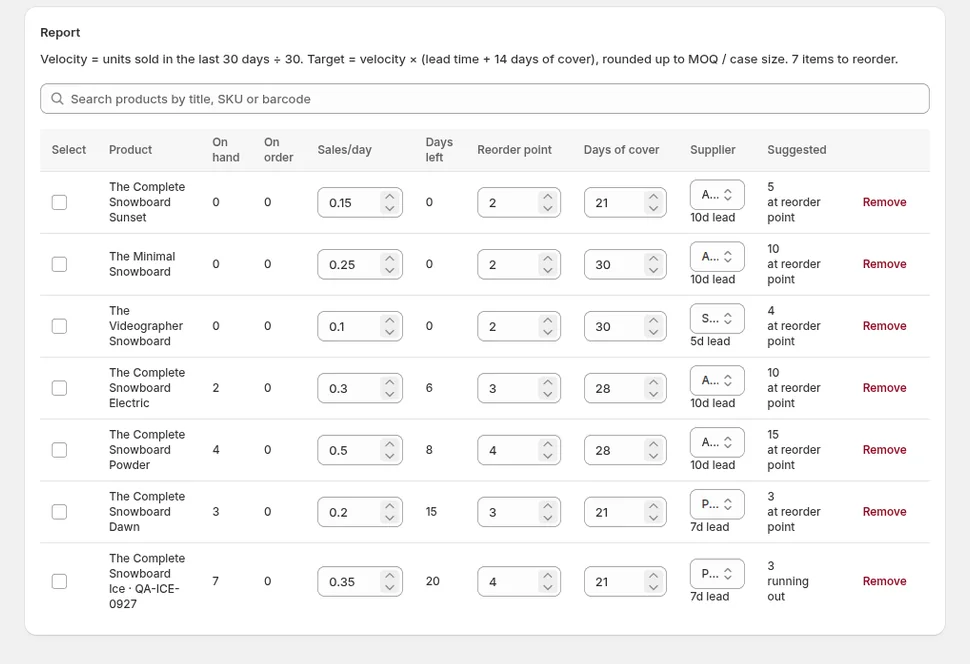
Side by side
| Question | Flow low-stock alert | Reorder report |
|---|---|---|
| Does it count stock already on order? | No, compares available to a threshold | Yes, position is on hand plus incoming |
| Does it adapt to how fast the item sells? | No, one static number per variant | Yes, velocity over a 7 to 365 day window |
| Does it know the supplier's lead time? | No | Yes, from the supplier record |
| Does it say how much to order? | No | Yes, rounded to case size and MOQ |
| Per location? | Only with a custom condition on inventory levels | Levels per location; velocity shop-wide |
| Fires once or shows a list? | One message when a line is crossed | A list you open, sorted by urgency |
| Cost | Free with Shopify | From $19/month |
Keep the alert for what it is good at
None of this makes the Flow alert useless. It is instant, and a report is something you open. For a handful of products where a stockout is an emergency rather than a planning failure, a hero product or a component every bundle depends on, an alert with the prior-quantity condition and a threshold set from the report's days-of-cover figure is exactly right. Flow can also do things a report should not, such as hiding a product from the storefront when it hits zero or tagging it for a back-in-stock collection.
A sensible division of labour for a small store looks like this.
- Add every item you buy regularly to the reorder report with its supplier, so lead time, case size and MOQ are known. Leave the reorder point blank for fast sellers and let velocity drive them; set one for slow but critical items.
- Open the report on a fixed day each week. Items with a suggested quantity are at the top; review them, untick anything you disagree with, and create draft purchase orders from the selection. Restock Ops groups the selected lines by supplier into one draft per supplier.
- For the five or ten items that must never be out, build a Flow alert with both the quantity and the prior-quantity condition. Set the threshold to roughly the supplier's lead time multiplied by the daily velocity the report shows, and revisit it when the report's velocity changes materially.
- When a delivery arrives, receive it against the PO so incoming clears and on hand rises in the same movement. A report is only as good as the incoming figure, and the partial receiving post explains why half-received orders should stay open rather than be closed early.
Where the report stops
Honesty about limits: a 30-day velocity does not know about a promotion you are about to run, a seasonal peak that starts next month, or a product you are discontinuing. For those, set a manual sales-per-day figure or a longer days-of-cover on the item for the period in question, then take it off. The report is also only as current as your last visit; if you want to be told rather than to look, that is the alert's job.
If your week currently ends with a search through the admin for anything that looks low, the report replaces that search with a sorted list and a button that drafts the orders. Restock Ops includes the reorder report on every plan, and the Flow alert keeps doing what it does for free alongside it.
FAQ
Can Shopify Flow send a low-stock alert only once instead of on every sale?
Yes, by checking both the new quantity and the prior quantity in the condition, for example quantity is 5 or less and prior quantity is more than 5. Shopify's Flow examples describe this pattern. Without the prior-quantity check the workflow runs on every inventory change below the threshold.
Does a Shopify Flow low-stock alert take incoming inventory into account?
Not by default. The trigger provides the variant's quantity and prior quantity, and the usual condition compares available stock to a threshold. Stock that is on a purchase order or transfer shows in Shopify as incoming but does not stop the alert from firing.
How is a reorder point different from a low-stock alert threshold?
A low-stock threshold is a number you pick for an alert. A reorder point in a reorder report is one input among several: the report also uses on hand, incoming, sales velocity, supplier lead time and days of cover to decide whether an item needs an order and how many units to suggest, rounded to case size and minimum order quantity.
Should I use a reorder report or Shopify Flow for inventory?
Both, for different jobs. Use the report for the weekly buying decision across every item you restock, because it accounts for incoming stock, velocity and lead time. Keep a Flow alert, with the prior-quantity condition, for the few items where you need an instant message the moment they run low.
Try it on your store. Restock Ops adds purchase orders with partial receiving, supplier notes, cost history, barcode labels, scanner stocktakes and a reorder report on top of Shopify inventory. From $19/month, 14-day free trial.