Delivery doesn't match the PO? Short, over and wrong items on Shopify
Supplier sent 40 instead of 48, added extras, or shipped the wrong colour. How to receive a mismatched delivery so Shopify stock and the PO stay right.
Every purchasing guide describes the happy path: order 48, receive 48, done. The delivery that arrives on a Tuesday afternoon is rarely that tidy. Two cases are missing from the pallet. One case has 14 units instead of 12. A line you ordered in navy has turned up in black because the supplier swapped it without asking. Three units are crushed. The invoice, when it arrives, disagrees with all of the above.
What you do in the next ten minutes decides whether your Shopify inventory is right for the rest of the season. This post goes through each kind of mismatch, what the honest record of it looks like, and how to enter it in Restock Ops so the purchase order keeps telling the truth about what the supplier still owes you.
The one rule: receive what arrived, not what was ordered
Shopify's receiving model, whether you use the native transfer that a purchase order creates or an app, is built around the quantity that physically arrived. The help centre describes receiving a transfer as accepting or rejecting units per shipment, with accepted units becoming available and rejected units staying out of stock (Receiving inventory transfers). Nothing about that model assumes the delivery matched the order.
The temptation on a busy day is to click Receive all, fix it later and get the pallet off the shop floor. Later rarely comes, and the result is a storefront selling eight units of a colour that is sitting in the supplier's warehouse. Every case below is a variation on the same move: count what is in the box, enter that, and let the purchase order show the difference.
Case 1: short delivery
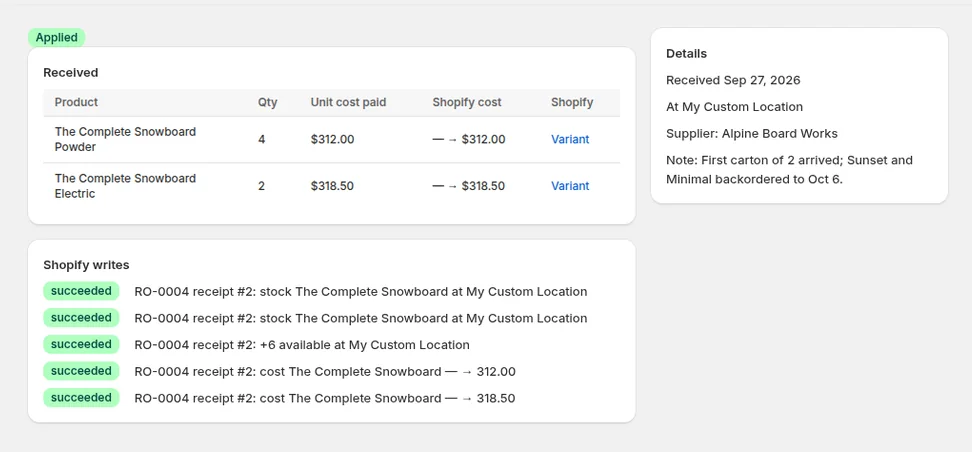
The most common mismatch. You ordered 48, the supplier shipped 40, and either the packing slip says so or it does not. Enter 40 on the receipt. The purchase order moves to Partially received, the line shows 8 outstanding, and Shopify's available quantity for that variant goes up by exactly 40.
The question is what to do with the outstanding 8. If the supplier confirms a back-order, leave the PO open; the next receipt against it closes the line and the reorder report keeps treating the 8 as incoming so it does not suggest buying them again. If the supplier says the 8 are not coming, close the PO. Restock Ops lets you close a partially received PO deliberately, which records that the remaining quantity was never delivered rather than pretending it was. The incoming figure clears, the reorder report recalculates, and a note on the PO header explains why. We covered the open-versus-close decision in more depth in the partial receiving post.
Case 2: over-delivery
Suppliers over-ship more often than people admit: a case that packs 14 when you ordered 12, a free sample box, a rounding-up to the carton. Restock Ops lets you receive more than the outstanding quantity. The receipt shows an over badge on the line and a warning that one or more lines receive more than remains on the PO, so you cannot do it by accident, but it does not stop you, because the units are real and they are on your shelf.
Record them. Shopify's available quantity goes up by the units received, the line shows received greater than ordered, and the receipt stands as the record that the extras came from this supplier on this date. Whether you pay for them is a conversation with the supplier, and the PO is now the evidence for it: if the invoice bills 14, you can see you got 14; if it bills 12, you got two for free and the cost history reflects the real landed unit cost once you adjust it.
- Receive the actual count, even when it exceeds the order.
- If the extras were not on the invoice, lower the unit cost on the receipt so the weighted average stays honest, or leave the cost and treat the extras as margin. Pick one approach and keep to it.
- Do not raise the ordered quantity on the PO to match. The order was 12; the record of what you asked for should not be edited to hide what you got.
Case 3: wrong item or substitution
A substitution is the case where the short cut does the most damage. If you receive the black units against the navy line because "it's the same shoe", Shopify now believes you have navy in stock. The storefront sells navy, the customer gets black, and the return costs more than the delivery was worth.
Restock Ops locks the lines of a purchase order once it has been marked Ordered, so you cannot quietly swap the variant on an existing line. That is deliberate. The record of what you ordered has to survive the delivery. The right entry for a substitution is in two parts.
- On the original PO, leave the navy line untouched. Receive zero against it. If the supplier will not be sending navy, close the PO once everything else is in so the outstanding units drop out of incoming.
- Create a new purchase order for the same supplier with the black variant and the quantity that actually arrived. Mark it Ordered, then receive it straight away. Shopify's available quantity for black goes up, navy stays where it was, and both documents are true.
- Put the original PO number in the new PO's reference or note so the two are linked when someone reads the history in six months.
- If the substitute is a product you have never stocked, add it in Shopify first; the receipt can only move stock into a variant that exists.
Case 4: damaged units
Crushed boxes, leaking bottles, a scratched frame. The count that matters is sellable units. If 3 of 48 are damaged beyond selling, receive 45 and write what happened in the receipt note. The 3 stay outstanding on the line, which is correct: the supplier still owes you 3 units or a credit for them, and the PO keeps saying so until the replacement arrives or you close the PO after agreeing a credit.
If you intend to sell damaged units at a discount, that is a different product. Receive them separately against a 'seconds' variant or adjust them in later with a reason, rather than receiving them as first-quality stock.
What the invoice does to all of this
The invoice usually arrives after the delivery and reflects the supplier's view of events, which may not match yours. Restock Ops keeps the invoice on the PO header, with its number, amount and paid status, so the comparison is on one screen: ordered quantity, received quantity, invoiced amount. A short delivery invoiced in full is a credit to chase. An over-delivery invoiced at the ordered quantity is a decision about whether to say anything. A substitution invoiced under the original SKU is an argument you can now have with the numbers in front of you. The supplier invoice post explains the header fields.
Unit costs are the other thing that moves. If the delivery was priced differently from the order, change the unit cost on the receipt, not on the PO line, so the cost history shows what you actually paid for the units that actually arrived.
| Mismatch | Quantity to receive | What happens to the PO | Follow-up |
|---|---|---|---|
| Short | What arrived | Partially received; outstanding shown | Leave open for a back-order, or close and chase a credit |
| Over | What arrived, flagged as over | Received; line shows more than ordered | Check the invoice; adjust cost if the extras were free |
| Substitution | Zero on the original line | Original line stays outstanding | New PO for the item that arrived; cross-reference both |
| Damaged | Sellable units only | Partially received | Replacement or credit; note the damage on the receipt |
Why not fix it in Shopify directly?
You can always open the variant in Shopify and type a new quantity. For a mismatched delivery it is the worst option, because an adjustment has no memory. Six weeks later nobody knows whether the 40 came from this PO, whether the 8 were ever delivered, or why black has stock when navy was ordered. A receipt against a PO carries the supplier, the date, the cost, the note and the gap between ordered and received, all of which are exactly the facts you need when the supplier's statement arrives. If someone has already made a direct adjustment and it was wrong, the post on reversing adjustments explains how to unwind it cleanly.
Mismatched deliveries are not an edge case; for small retailers buying from many suppliers they are most deliveries. The workflow above takes a minute longer than Receive all and saves hours of guessing later. Restock Ops handles receiving against a PO, including partial, over and closed-short receipts, on every plan.
FAQ
What should I do if a supplier delivers fewer units than my Shopify purchase order?
Receive the quantity that arrived. The purchase order becomes partially received and shows the outstanding units. Leave it open if the supplier has confirmed a back-order so the units stay counted as incoming, or close it if they are not coming so your reorder suggestions stop assuming they are.
Can I receive more units than I ordered on a Shopify purchase order?
In Restock Ops, yes. The line is flagged as over and the receipt warns you, but the extra units are added to Shopify's available quantity because they are physically in stock. Do not edit the ordered quantity to match; the PO should show what was asked for and the receipt what arrived.
How do I record a substitution when the supplier sent a different variant?
Do not receive the substitute against the original line, because Shopify would then show stock for a variant you do not have. Receive zero on the original line and create a new purchase order for the variant that arrived, receive it straight away, and cross-reference the two PO numbers in the notes.
Should damaged units be received into Shopify inventory?
Only sellable units should be received as first-quality stock. Receive the undamaged count, note the damage on the receipt, and leave the damaged units outstanding on the line until the supplier replaces them or issues a credit. If you will sell them as seconds, receive them against a separate seconds variant.
Try it on your store. Restock Ops adds purchase orders with partial receiving, supplier notes, cost history, barcode labels, scanner stocktakes and a reorder report on top of Shopify inventory. From $19/month, 14-day free trial.